
StudioSpell v3.0

free trialbuy now

Overview
Support Forum
Licensing


What Sets It Apart

Unique summary screen
Team friendly
API documentation comment checking
Non-sense string ignoring


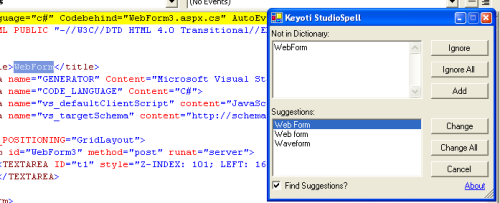
StudioSpell is an easy to use speller Add-In for Microsoft Visual Studio (tm) .NET (2005, 2003, 2002)

, providing a user friendly tool for checking web-page Html and strings in source code - StudioSpell analyzes only the text that could appear in-front of a user.
Features

API documentation comments are spell checked, and the spell checker can optionally be set to only check API comments.

URL and email strings (eg. www.domain.com, http://domain.com, john@domain.com) can optionally be ignored. Duplicate words in text (eg. "this is is an error") can optionally be presented as errors.

Options are stored in the registry by default, however they may be optionally stored in an XML file with the project, this is useful for project specific settings and it also allows settings to be moved with the project into and out of source control systems.

Custom dictionaries can be saved in a user specific location, or within the project making it team wide.

Files to check are user configurable, by default StudioSpell recognizes and checks;
aspx, cs, vb, jsl, ascx, htm, html, asp, cpp, resx, xml

For each of these, only content likely to be displayed, is queried to the user.

Details

StudioSpell uses the RapidSpell Desktop .NET component to spell check code on most file types (aspx, cs, vb, jsl, ascx, htm, html, asp, cpp, resx, xml) inside Visual Studio.

Each file type has specific rules for text to check, eg;

  • HTML/ASPX/ASP pages; text inside the body and outside of html tags, and text strings in Javascript blocks are checked.
  • CS/VB/JSL/CPP; text inside string literals is checked.
  • RESX (resource file); text data inside value and comment tags is checked.


Fully Functional Evaluation

Questions?


About | Contact | Site Map | Privacy Policy

Copyright © 2002- Keyoti Inc.