RapidSpell provides a powerful .NET spell checking control for web and desktop developers, allowing you to add a spell checker to ASP.NET (incl. MVC, AJAX, Razor etc), Windows Forms, WPF and Silverlight applications quickly and easily. All editions of RapidSpell come with 5 free English dictionaries, with an additional 17 non-English dictionaries also available (inc. Medical & Legal dictionaries).
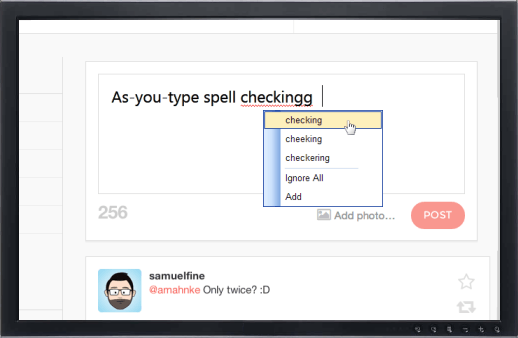
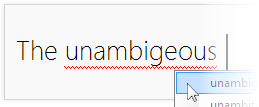
Spelling errors are highlighted as the user types, and edits text within your application.
Users can right-click a spelling mistake to see a context menu with suggested corrections and options to 'Ignore All' or 'Add' a word to the custom dictionary.
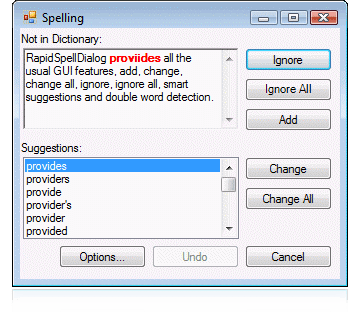
Dialog spell checking mode
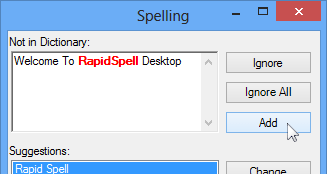
RapidSpell provides all the usual dialog GUI spell checking features, add, undo, options, change, change all, ignore, ignore all, smart suggestions and duplicate word detection.
Spell check text, accepts manual corrections, has comprehensive suggestions, allows user to edit text within the main document during spell check and also supports an editable user-dictionary.
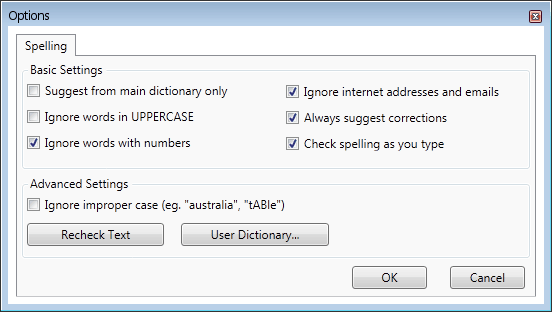
User options
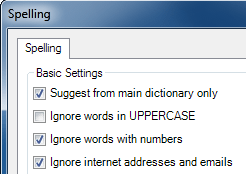
The customizable options forms provide the user with several spell checking options and the ability to modify the contents of their 'user dictionary' (if activated).
Adding a spell checker to web applications has never been easier – the only requirement is for your server to support ASP.NET (2.x, 4.x, Core, 5+)
MVC
Simply add a single JavaScript file to your application to provide inline or dialog spell checking to MVC, ASP, ASP.NET & Razor web applications.
Razor
RapidSpell Web .NET is fully compatible with the Razor view engine.
Customization
The API was designed to provide for easy customization, both in behavior and design. The dialog GUIs can be redesigned by simply modifying the UI source code in the VS designer, source is included in the demo projects. The spellchecker engine is 'decoupled' from the GUI making it possible to use custom word parsers with the GUI.
RapidSpell Desktop for Windows Forms and RapidSpell Web for ASP.NET were designed to the Microsoft .NET framework .NET 2.0, .NET 4.0, Core and .NET 5+ specification, and fully support Visual Studio .NET 2008 through 2022.
RapidSpell for WPF was designed to Microsoft WPF 3.0, 3.5, 4.0 specification, and fully supports Visual Studio .NET 2008 through 2022.
Our Silverlight edition includes dedicated DLLs for Microsoft Silverlight SDK v3, 4, 5 and Windows Phone 7.
The main language dictionary can be easily modified with our GUI tool or API. Each user can also have their own 'user dictionary', linked to the Add button.
Auto correct
English auto-corrections are built in to the product and modifiable.
Minimal footprint
Each product has been designed to have minimal integration footprint on your application - for example RapidSpell Web .NET can be integrated with just one .js file import.
Core spell checking class for strings
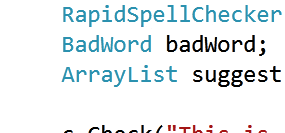
RapidSpellChecker provides a non GUI component for core spell checker functionality and ease of use - you pass the text you want checked and then iterate through each misspelled word finding suggestions and correcting as you go.
Suitable for Windows server applications as well as any console application. It supports a user dictionary and run-time switchable main dictionaries.
All RapidSpell .NET spell checkers include Dict Manager free, which allows complete customization of the dictionaries as well the ability to create your own dictionaries from text files.
Multiple text box checking
Multiple .NET textboxes can be spell checked from one instance of the controls.
Compressed dictionaries
The core English dictionaries are only 267KB.
Minimum base browser requirements
RapidSpell Web .NET works in Internet Explorer, Firefox, Chrome, Opera, Safari and Android Browser. It uses only HTML and Javascript, this means there are no special requirements, plugins, or long downloads, as with some other .NET spell checking controls.
Regular & 3rd party text box support (plain, rich, custom)
Supports 3rd party .NET controls either out of the box or through interfaces.
Such as "TX Text Control", DevExpress "XtraGrid" & "MemoExEdit" and Janus' "GridEX" & "EditBox", and others.
RapidSpell Desktop .NET adds an as-you-type and dialog spell checker to any textual Windows application such as; data entry, email, word-processing and messaging apps. Written for .NET Win Forms in C#, RapidSpell Desktop .NET has a multi-threaded GUI, powerful suggestion engine and can also be used in non GUI contexts using its spell checking API.
Our Windows Forms
spell checking control has been in active
development for over 10 years and used by
thousands of happy developers and millions of end-users, world-wide.
RapidSpell Web .NET
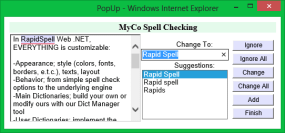
RapidSpell Web .NET allows users to spell check any text box or rich HTML control on your web form.
Inline, as-you-type and dialog spellchecking can be added to your ASP.NET web site in a matter of minutes.
Highly customizable, extremely flexible and superior in performance, RapidSpell Web .NET is also compatible with any page type including; ASP.NET, AJAX, MVC, Razor, ASP, HTML & more.
RapidSpell WPF
RapidSpell WPF can be integrated in to any application to provide a fully independent and highly customizable WPF spelling extension. RapidSpell WPF also includes a core spelling control for checking strings. Written exclusively for WPF, RapidSpell WPF was built upon the solid core of our Win. Forms version with a fresh, purpose built WPF top layer - including customizable XAML UI.
RapidSpell Silverlight
Add a dialog spell checker to Silverlight applications (SL v3, v4, v5 and Windows Phone 7).
Spell checks plain text boxes, rich text boxes (SL v4+) and 3rd party controls. Designed to have a minimal foot-print, uncompressed, the DLL and English dictionary total only 570KB.
Providing 1st class support is very important to us - we have a solid reputation for great support because we usually reply with-in an hour and with difficult questions or requests we go the extra mile
to find a satisfactory solution.
We want you to love our product and if you don't, we want to know how we can improve it.
Licensing
All of our products are available royalty free, with perpetual licenses, we also offer maintenance contracts. Please select the edition of RapidSpell in the list above and click 'buy now' or 'more info' to find licensing information specific to the product.