Title Back Colour Keyoti Title Line Title Curve Title Right
Blue Box Top

Java Spell Checker

RapidSpell Desktop Java v2.2.1
free trialonline demobuy now
Blue Box Bottom

Blue Box Top
Overview
Support Forum
Licensing
Dictionaries
Screenshots
Documentation
Version History
FAQ
Knowledge Base


Home >  Java Components >  RapidSpell Desktop Java

What Sets It Apart
Light Blue Background

As-you-type java spell checker
Open API
Simple usage
XML/HTML support
Open QuoteClose Quote

Light Blue Background
Also available for J2EE web applications - RapidSpell Web Java
Phone
1 877 453 9684
+1 250 941 6545
Email
Support Forum
Office hours:
9am - 5pm PT (GMT-8)

Dialog and as-you-type spell checking for Java applications.

RapidSpell Desktop Java adds spell checking to any GUI/nonGUI textual application (email, word processor etc) with a couple of lines of code. Can also be used on servers to provide spell checking functionality. A clean API and no native code make adding a java spell checker to your applications a simple task. Uses, combined or separate customizable 140,000 word U.S. & U.K. dictionaries (and user dictionary), multi-threaded GUI and a powerful suggestion engine. Australian and Canadian English dictionaries are included.
Product overview image

General Details
Light Blue Background

RapidSpell Desktop Java provides 3 Swing Beans to add java spell checking functionality to your Swing GUI or non GUI (eg; console/server) applications.

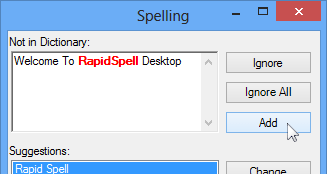
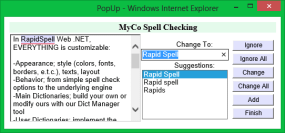
The RapidSpellGUI Bean offers users all common dialog features and smart suggestions. It interactively spell checks ANY JTextComponent derived component such as JEditorPane, JTextPane, JTextArea and JTextField.

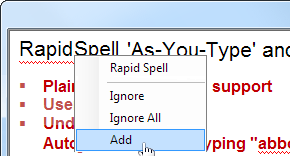
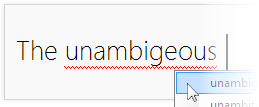
The RapidSpellAsYouType Bean provides as-you-type spell checking with full in-document highlighting in any JTextComponent derived component. RapidSpellAsYouType highlights spelling errors as they are typed/pasted/edited, providing suggestions in a right-click context menu.

The nonGUI Bean provides core spell checking functionality suitable for deep integration, user interface rewrites or console applications. It has been clocked at 50,000 words/sec on a basic 1GHz PC. The main dictionary may be customized or created from scratch with our free Dict Manager tool.

The Dict Manager tool

The Dict Manager tool (included free of charge) provides developers with a user friendly method of maintaining the dictionaries. Add, lookup and remove words. Create new dictionaries or merge existing word-lists.

Technical
Light Blue Background

RapidSpell has built-in multi-lingual support, offering the GUI in several languages. Multiple non English language dictionaries are available.

The user interface can easily be restyled by extending its class and overriding the design method (an example of this is included). The spell checker engine can be completely separated from the GUI allowing you to customize behavior.

The non GUI component provides core functionality and ease of use - you pass the text you want spell checked and then iterate through each misspelled word finding suggestions and correcting as you go. You have access to the corrected text at any time.

The Beans are loadable into any IDE or RAD tool that supports JavaBeans.

As each user and each application is different, sometimes you need to offer spelling suggestions tailored to your target audience. RapidSpell Desktop Java offers two different suggestion mechanisms to find the best suggestions for words.

RapidSpell Desktop Java was designed to JDK 1.2.2 spec and supports any version after that.


Light Blue Background

Download RapidSpell Desktop Java

F.A.Q.

Also available, RapidSpell for: .NET Win Forms
ASP.NET
Silverlight
WPF
Web Java (JSP)

Questions?

Borland

Light blue background
Blue Box Bottom


About | Contact | Site Map | Privacy Policy

Copyright © 2002- Keyoti Inc.